Product Description
Multi PLC Workbench will have TechnicalSpecifications:
1.PLC 1: Schneider Electric
1. Digital input: 14-16 nos.,
2. Digital output: 10 -14 nos.,
3. Programming software: SchneiderTM200/ Eco Struxure
4. Programming cable: USB
2. PLC 2: Mitsubishi
1. Digital input: 16-18 nos.
2. Digital output: 16-18 nos.
3. Programming Software: GOC Tool kit
4. Communication: Ethernet
3. PLC 3: Fatek
1. Digital input: 8 -10 nos.
2. Digital output: 6 -10 nos.
3. Programming Software: WinProladder
4. Communication: USB
4. PLC 4: Delta
1. Delta Digital input: 24 -28 nos.
2. Digital output: 16 -18 nos. (relay)
3. Programming Software: ISPSoft
4. Programming cable: USB
5. PLC 5: ABB
1. Digital inputs: 6 -10 nos.
2. Digital output: 4 -09 nos.
3. Analog Input: 2 nos
4. Analog output: 1 no.
5. Programming software: ABB automationbuilder
6. Programming cable: Ethernet
6. PLC 6: Omron
1. Digital input: 18 -21 nos.
2. Digital output: 12 -18 nos. (relay)
3. Programming software: CX -One
4. Programming cable: USB
7. PLC 7 Allen Bradley
1. Digital input: 8 -12 nos.
2. Digital output: 07 -11 nos. (relay)
3. Analog input: 04 - 9 nos.
4. Analog output: 01 - 5 no.
5. Programming software: ConnectedComponent Workbench
6. Programming cable: Ethernet
8. PLC 8: Siemens
1. Digital input: 8 -11 nos.
2. Digital output: 04 - 8 nos.
3. Analog input: 2 - 6 nos.
4. Analog output: 02 - 6 nos.
5. Programming Software: LOGO SoftComfort
6. Programming cable: Ethernet
9. PLC 9: Wecon
1. Digital input: 8 -11 nos.
2. Digital output: 6 -11 nos. (relay)
3. Programming Software: Wecon PLCEditor
4. Programming cable: USB
AC Power Supply
a. Single Phase MCB - Single Phase MCB
b. Three Phase MCB - Three Phase MCB
DC Power Supply
DC Power Supply: +24VDC (6.5A) +12VDC(1A) +5VDC (3A)
Potentiometer
Switches module
1. Pushbutton switch: 4 - 6 nos.
2. Push on push off switch: 4 - 6 nos.
3. PLC connection: 4mm sockets
Sensor module
1. Proximity sensor: 2 nos.
2. Photo sensor: 2 nos.
3. RTD: 2 nos.
4. PLC connection: 4mm sockets
Relay control module
1. Double pole/through relay: 4 -6 nos.
2. Relay operating voltage: 24VDC
3. PLC connection: 4mm sockets
Indicators module
1. Visual indicator: 4 -6 nos.
2. Operating voltage: 24VDC
3. Audio indicator: 2- 4 nos.
4. Operating voltage: +5V/+12VDC
5. PLC connection: 4mm sockets
PLC Interactive Learning Software willhave following Technical Specifications:
1. The learning module covers following topics:
Industrial Automation and tools like PLC,SCADA, HMI, DCS.
Role of PLC in Automation
History of PLC
Types of PLC like Mini, Micro & Rack
Block diagram of PLC
Working of PLC
Sinking and Sourcing Concept PLC ProgramCycle
2. Input Devices:
Switches, Introduction, Switch State,Basic Switch Configuration, Toggle Switch, Slide Switch, Pushbutton, RockerSwitch, DIP Switch, Reed Switch, Limit Switch.
Sensors, Actuators, State Relay InductionMotor Programming Concept: Normally Open and Normally, Close Contact, Set andReset, Memory Bit, Types of Logic Gates, Timer, Counter, PWM, Compare, ADC, DACExample Ladder Program Variable Frequency Drive (VFD)
Introduction of HMI Introduction ofSCADA
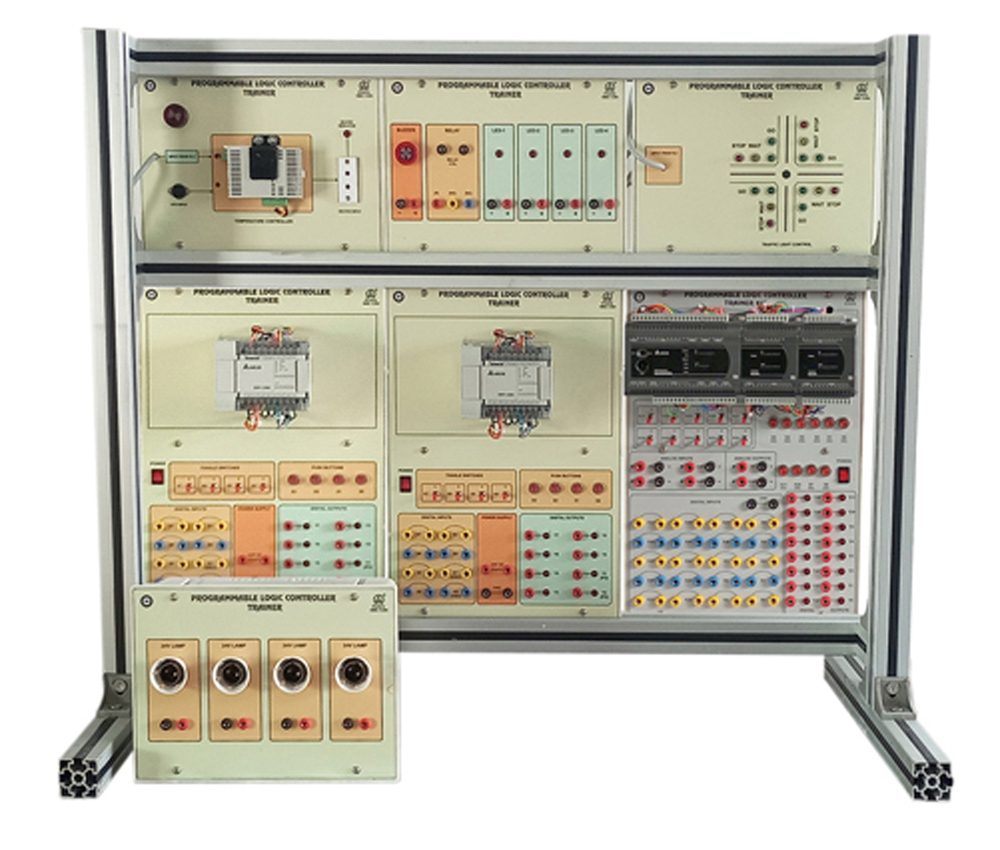
Comprehensive PLC Training PlatformThis workbench provides a versatile platform for hands-on learning in industrial automation. With support for multiple PLC brands and modular experiment panels, it enables sequential control, motor operations, interlocking, and process automation exercises. Its design ensures flexibility in training while offering real-world simulation capabilities.
Safe and Durable ConstructionBuilt with a powder-coated metal frame and high-grade plastic panels, the workbench ensures longevity and safety. Integrated features like overload and short-circuit protection, as well as an emergency stop, provide a secure environment for students and trainees during experiments.
Flexible Usability and ExpandabilityDesigned for educational environments, the workbench supports USB and Ethernet connectivity for PC interfacing and SCADA integration. The replaceable module panels and expandable I/O options allow for adaptations to various training needs, making it a suitable investment for evolving industrial skill requirements.
FAQ's of Multi PLC Workbench:
Q: How does the Multi PLC Workbench support hands-on PLC training?
A: The workbench is equipped with replaceable modules for sequential control, timer/counter, interlocking, and process automation exercises. Users can connect real PLC hardware, practice using different programming languages like Ladder Diagram and Function Block, and interface with industrial components such as push buttons and sensors.
Q: What PLC brands are compatible with this training workbench?
A: This model is compatible with PLCs from Siemens, Allen Bradley, Mitsubishi, Delta, and Omron, depending on the specific modules installed. This broad compatibility ensures that students receive exposure to widely-used industrial control systems.
Q: When should the workbench be used in an educational setting?
A: The workbench is ideal for use during practical sessions in engineering labs, technical training institutes, and industrial skill development programs. It's designed for regular classroom and lab activities focusing on industrial automation and PLC programming.
Q: Where is the Multi PLC Workbench best installed and operated?
A: This equipment should be installed in indoor laboratory environments, preferably in a dry location with standard AC mains supply. Its dimensions and weight make it best suited for spacious lab settings where multiple students can access and operate it safely.
Q: What is the process for setting up and expanding the workbench for multiple practicals?
A: Setting up involves connecting the workbench to mains power, selecting and slotting in the required PLC modules or experiment panels, and connecting any additional sensors or I/O modules as needed. Panels and modules are designed to be easily interchanged to accommodate different experiments or PLC models.
Q: How does the workbench ensure safe operation during training?
A: Safety features include short-circuit and overload protection, an emergency stop switch, isolated panel wiring, and durable material construction. Each module is also clearly labeled to minimize operation errors and enhance user confidence during practical sessions.
Q: What are the primary benefits of using this PLC Training Workbench?
A: Students and trainees gain practical experience with multiple PLC systems, learn industry-standard programming methods, and develop troubleshooting skills in a safe, controlled environment. The design's flexibility supports evolving curriculum needs, making it a valuable resource for technical education and industrial training.









 Send Inquiry
